Know What
It Sells For.
In Your Booth.
Snap a photo. Get the price your local buyers will actually pay.
Price Something Right Now
Try it free, no account · a real price in seconds
One free demo per visitor · Results in under 10 seconds
Don't take our word for it. Grab the nearest item, snap a photo, and see your price — before you even create an account.
No credit card required · Results in under 10 seconds
Not an eBay guess — every price is calibrated to your venue, your region, and how you sell. Then add it to inventory and print your tag, all in seconds.
Thousands
of items priced
<10 sec
photo to price
Works across
the US and Canada
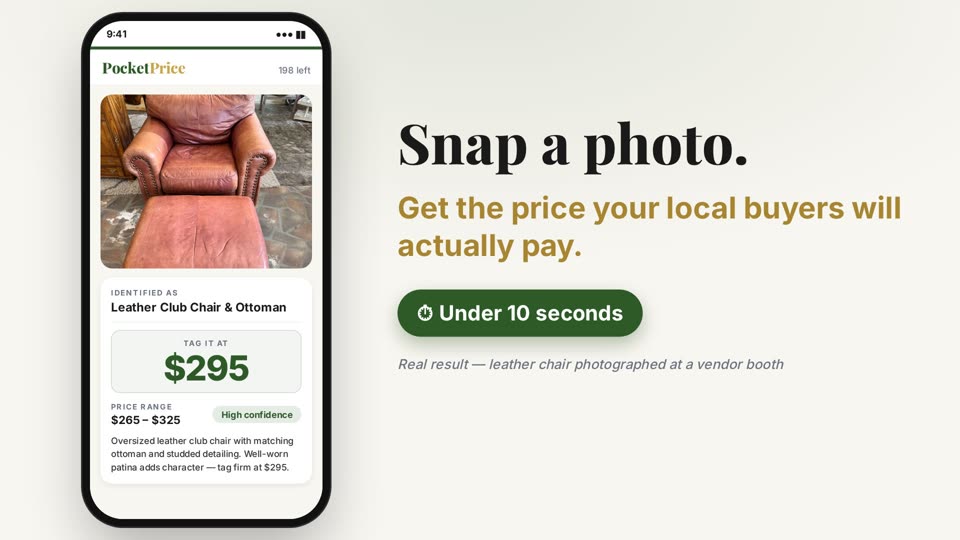
Identified As
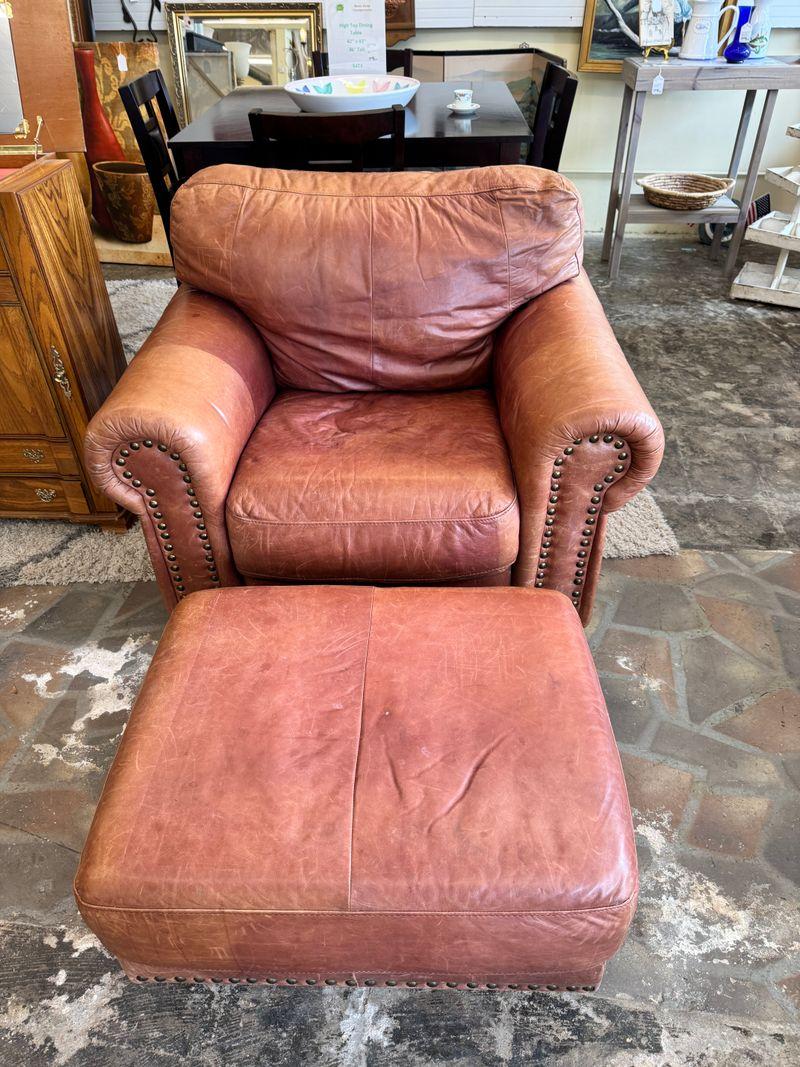
Leather Club Chair & Ottoman
Tag It At
$295
Price Range
$265 – $325
Furniture
Oversized leather club chair with matching ottoman and studded detailing. Well-worn patina adds character — tag firm at $295.
Real result — leather chair photographed at a vendor booth
Built for
- Booth Vendors
- Antique Mall Sellers
- Flea Market Sellers
- Antique Dealers
- Yard Sale Hosts
- Resellers & Flippers
- Consignment Shops
- Online Resellers
- Estate Sale Professionals
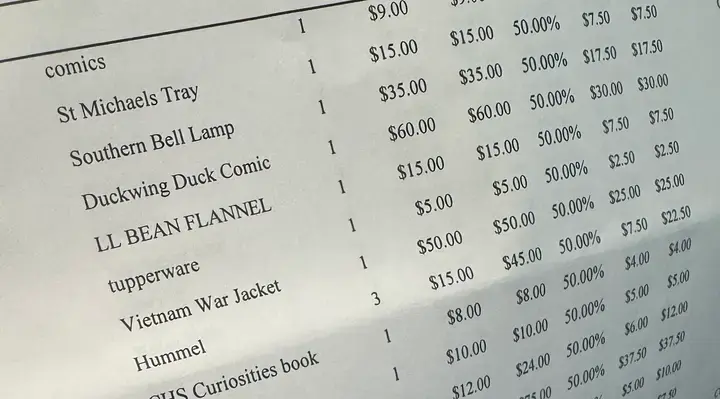
Snap Your Mall Sales Sheet.
See What Really Sold.
Take a photo of your antique mall’s sales sheet or monthly statement. Every line comes back as an item sold, with what it actually brought in after the mall’s discount. Your first sheet is free, no account needed.
Photo or PDF. We never keep your photo; the lines we read are saved for 24 hours so you can add them to a free account.
From Photo to Shelf-Ready
Snap, price, inventory, and label every item — all in one app, personalized to how you sell.
- 1
Photo
Snap a photo
Point your camera at any item and PocketPrice identifies it, reads maker's marks, and returns a price range with a confidence score and plain-English recommendation — calibrated to your venue, your region, and how you sell.
- 2
Inventory
Add it to your list
Save the item with photos, price, location, and SKU in one tap. Tag a whole booth or shelf, then filter by status, category, or location the moment you need to restock or check what moves.
- 3
Labels
Print your tags
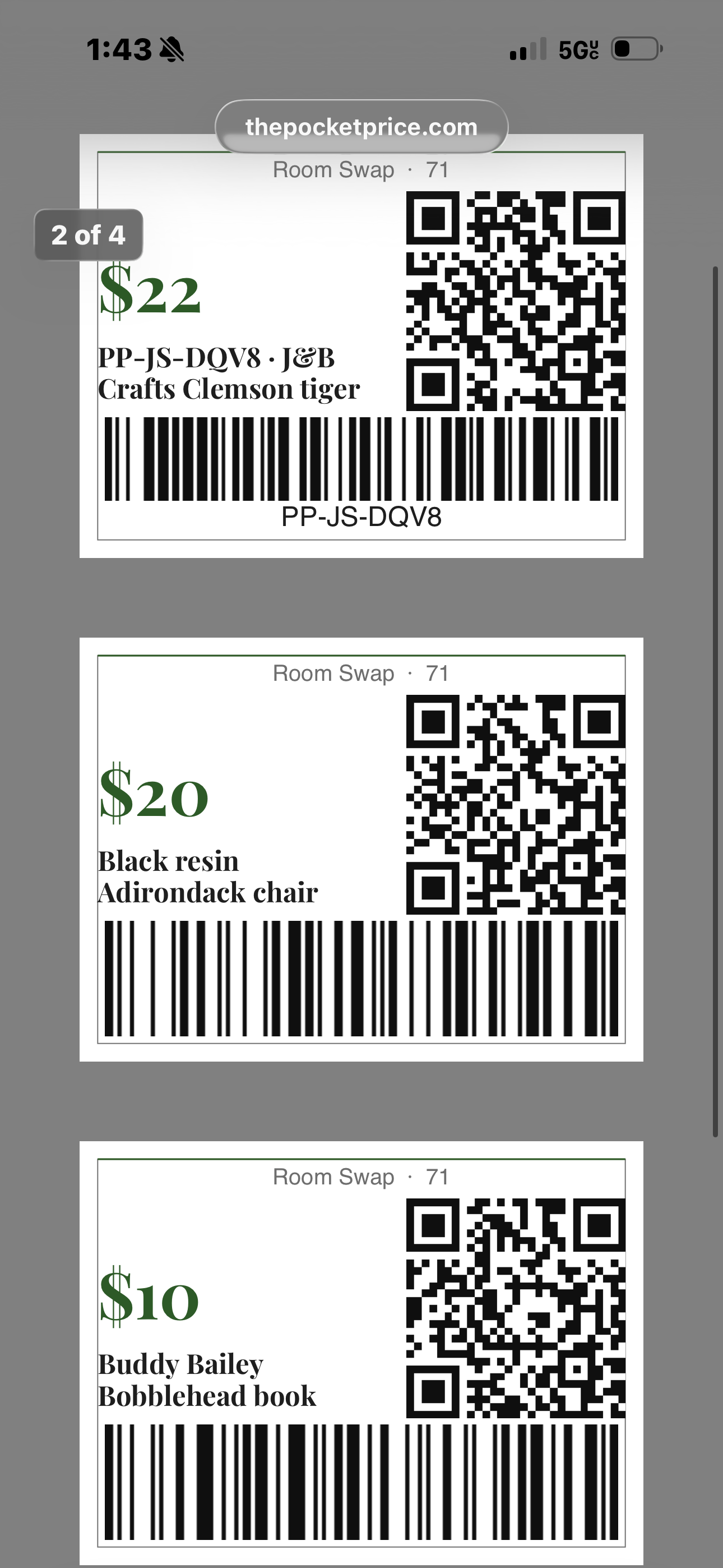
Download a printable sheet of price tags — 12 per page, ready to cut and place. Every tag includes QR codes for shoppers, barcodes for mall POS, and your booth number and company name.
Straight from the booth
Real Items. Real Tags. No Mockups.
Price 50 Items.
Print Every Tag.
Setting up a booth? Tagging an estate? Batch Mode lets you snap photos of every item, process them all at once, and print a full sheet of price tags — ready to cut and place. No more pricing one item at a time.
- ✓Add up to 50 items per batch — snap, describe, and move on
- ✓Process the entire batch in one tap
- ✓Every batched item saved to your inventory — searchable, editable, ready to reprint
- ✓Print price tags — 12 per page, ready to cut
- ✓Your booth number and company name on every tag
- ✓Email results to yourself — let your team price without the worry
- ✓Close the app mid-batch? Pick up right where you left off
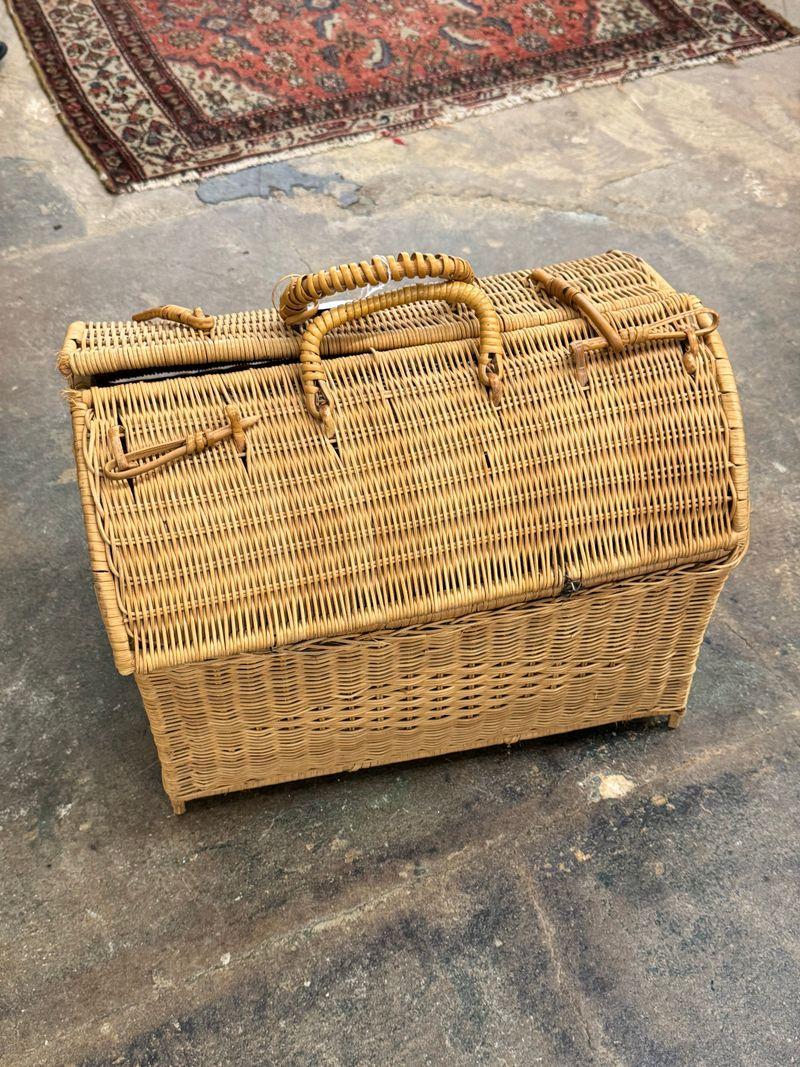
Printable Price Tags
Booth 14
Leather Club Chair
$295
Booth 14
Wicker Picnic Basket
$24
Booth 14
Jadite Mixing Bowl
$38
Booth 14
Cast Iron Skillet
$45
Batch results with printable price tags — booth number included
Run Your Whole Booth From Your Phone
Pricing is only the start. PocketPrice keeps your inventory, reads your mall’s sales statement, tracks booth rent and mileage, and tells you what you actually cleared, all in the same app.
Booth 14 · September
Statement readSold (38 items)
$2,480
What those items cost you
−$910
Booth rent, mileage, supplies
−$385
Net profit
$1,185
Avg days on floor
19
Best supplier
Barn auction
Sales, cost of goods and expenses in one place — example month
Sales Report Scanner
Snap your mall statement, log every sale
Photograph each page of your antique mall statement or the sales sheet you kept at your table, or upload the PDF or spreadsheet. Every line is matched to your inventory, marked sold at the price you actually got after discounts, and nothing saves until you check it.
Inventory
Every piece, every booth, every SKU
Photos, cost, price, SKU, location and status for everything you own. Filter by booth, category or age, and print tags with QR codes and mall POS barcodes. Consigned pieces track who is owed what.
Receipt → Inventory
Your receipt is your inventory list
Photograph a thrift or auction receipt in the parking lot. Every line becomes an item with its real cost, sales tax split across the pieces, and the store saved as the supplier.
Expenses & Mileage
Booth rent, gas and supplies, tax-ready
Recurring booth rent, a real mileage log, and supplies kept apart from what you paid for stock. Weekly, monthly, quarterly and year-end reports, with receipt photos and an export your accountant can use.
Profit Analytics
Find out what actually pays you
Revenue, gross margin and net profit for any period, plus sell-through and days on the floor by category, supplier and location. The shop you love sourcing from is not always the one paying you.
Markets & Shows
Load the truck, ring up sales offline
Pull a load from your inventory, print tags for just that load, and scan to ring up sales at flea markets and antique shows, even with no signal. Close out knowing what the day cleared.
Weekly Challenge
6 of 10 loggedPyrex Mixing Bowl Set
Kitchen · Sold in 3 days
$42
Vintage Levi 501s
Clothing · Sold in 1 day
$65
Brass Table Lamp
Furniture · Sold in 5 days
$28
Log what sells, earn free lookups, sharpen your pricer
It Learns From
Every Sale You Make
Log what sold, for how much, and how long it sat. Correct a price that was off. Over time, your pricer builds a model based on your actual results — not generic data.
- ✓Log sold items — price, category, days on the floor
- ✓Correct any estimate and your pricer remembers
- ✓Weekly challenge: log 10 sales, earn 5 free lookups
- ✓Your data stays private — only your pricer sees it
Pricing
Start free. Upgrade when you’re ready. No contracts, cancel any time.
Prices shown in USD. Canadian sellers are billed in CAD — pricing shown after signup.
Every plan, including Free
- Sales statement scanner
- Receipt to inventory
- Expenses & mileage
- Profit analytics
Free
For trying it on your own items. No credit card.
- 15 lookups to get started
- Venue & region calibration
- Confidence score & recommendation
- 1 sample batch (up to 10 items)
- Inventory list (up to 25 items)
- 1 market or show event
Hustler
For yard sales, side hustles and casual flipping
- 75 lookups per month
- Venue & region calibration
- Confidence score & recommendation
- Inventory for up to 250 items
- Unlimited market & show events
Picker
For booth vendors, antique mall and flea market sellers
- 200 lookups per month
- Everything in Hustler
- Batch Mode with printable price tags
- Inventory for up to 1,000 items
- Unlimited market & show events
Vendor
For estate sale companies and dealers with several booths
- 750 lookups per month
- Everything in Picker
- Built for estate sales: day pricing and pull-to-auction alerts
- Sell-through logging
- Inventory for up to 5,000 items
- Unlimited market & show events
Day pricing and pull-to-auction alerts turn on for estate sale sellers on any plan.
Pro $49.99/mo and one-time lookup packs
- Secure checkout by Stripe
- Cancel anytime
- No credit card to start free
- Top-ups never expire
Just having a yard sale or pricing a cleanout?
Skip the subscription. Buy a one-time lookup pack — the lookups never expire, and you can use them on the free plan.
100 lookups
A weekend yard sale
250 lookups
A whole-house cleanout
500 lookups
Best value
USD · Canadian sellers billed in CAD · One-time charge, no subscription
Frequently Asked Questions
Everything you need to know before your first lookup.
How is PocketPrice different from searching eBay sold listings?
eBay sold listings give you raw data — but raw data doesn't know your venue, your region, or your buyers. PocketPrice filters and weights comps to match your specific selling context, adds a confidence score, and gives you a plain-English recommendation you can act on immediately.
Can PocketPrice read my antique mall sales statement?
Yes. Tap Upload sales on your inventory page and photograph every page of your mall's monthly statement, or the sheet you kept at your table, or upload the PDF or spreadsheet. Every line is read and matched to your inventory by SKU or name, then marked sold at the price you actually received after mall discounts. You check the matches before anything is saved, and items already logged are skipped, so uploading the same statement twice never double-counts a sale.
Can I photograph a receipt and get the items into my inventory?
Yes. Tap Add receipt on your inventory page and the camera opens straight away. Every line on the receipt comes back as an item card with its cost filled in, and sales tax is spread across those lines in proportion to what each one is worth — so the cost recorded against each piece is what you actually paid, not the shelf price. Untick anything that is not stock, photograph the pieces you want priced, and one button puts them in your inventory ready to price. Faded or crumpled receipts can be harder to read, so you can correct any line before you save, and the receipt photo is kept either way.
A receipt line says three of something. Do I get three items?
By default, yes — three hats from a thrift store are three things to photograph, price and sell, so they arrive as three separate items each carrying its share of the cost. If you bought them as one lot and intend to sell them that way, tap the toggle on that line and it becomes a single item holding the whole cost instead. Either way the money adds up to what the receipt says.
Can I see which store or estate sale actually makes me money?
Yes. Every item carries a supplier, filled in automatically from the receipt and editable whenever you like. You can sort and filter your whole inventory by it, and the analytics break down what each source has earned you, what it cost you, and how quickly its items sell. It is a common surprise: the shop you enjoy visiting most is often not the one paying you best.
Does PocketPrice track my business expenses too?
It tracks the costs that are not tied to any one item — booth rent, mileage, supplies — separately from what you paid for stock, so your cost of goods stays clean and nothing gets counted twice. Receipt photos are stored with each expense, so at tax time the picture and the figure are in the same place.
Can I price an item just from a photo — even if I have no idea what it is?
Yes. Snap a photo and PocketPrice identifies the item, reads maker's marks and signatures, and gives you a price — even if you have no idea what you're holding. A clear photo is all it needs. Unusual items or tough lighting may lower the confidence score, and when that happens you'll see it flagged so you know to take a closer look. You don't need to know the maker, the era, or the pattern name going in.
What types of items does PocketPrice price?
Antiques, collectibles, vintage clothing, furniture, pottery, jewelry, tools, toys, records, books, and general resale goods. If there's a resale market for it, PocketPrice can price it.
Can I keep track of my inventory in PocketPrice too?
Yes. Every item you price can be saved to your inventory with photos, SKU, price, location, tags, and status — draft, listed, on hold, sold, or archived. Search and filter by status, category, location, or price the moment you need to restock or check what moves. When it's time to print, select items and download a sheet of price tags with QR codes for shoppers, barcodes for mall POS, and your booth number and company name. Item caps scale with your plan: Free 25, Hustler 250, Picker 1,000, Vendor 5,000, Pro unlimited.
Do lookups reset every month?
For paid plans (Hustler, Picker, Vendor, Pro), yes — your lookup count resets on your billing date each month. Free trial lookups (15 total) do not reset. Top-up packs never expire.
How are people using PocketPrice?
Booth vendors price new inventory before it hits the shelf. Estate sale companies tag entire households room by room. Pickers snap photos at auctions to decide what to bid on. Yard sale hosts figure out what to charge for a garage full of stuff they haven't looked at in years. Consignment shops verify intake pricing. Flippers check margins before buying. Every recommendation is calibrated to your venue, your region, and how you sell — so whatever the context, the price fits.
What happens when I run out of lookups?
You can add lookups instantly with a one-time top-up pack (100 for $7.99, 250 for $17.99, or 500 for $29.99 USD — never expire), or upgrade your plan for a higher monthly allotment. Canadian sellers are billed in CAD at equivalent pricing. You'll never lose access mid-sale.
How do I get the most accurate prices from PocketPrice?
Be honest with your corrections and sales logs. When you tell PocketPrice a price was off, or log what an item actually sold for, it uses that data to calibrate future recommendations to your market. If the feedback is accurate, your pricer gets sharper over time. If it's not, it learns the wrong patterns. The more real data you give it — actual sale prices, genuine corrections, accurate item descriptions — the better it gets at predicting what moves at your price point.
What is Batch Mode and how does it work?
Batch Mode lets you price up to 50 items in one session — available on Picker, Vendor, and Pro plans (free accounts get 1 sample batch of 10 items). Snap a photo and add a quick description for each item, then process the entire batch at once. When results come back, you can download a printable PDF of price tags (12 per page with cut lines), complete with your booth number and company name. You can also email the results to yourself. If you close the app mid-batch, your progress is saved and you can pick up right where you left off.
How does Train Your Pricer work?
When you log actual sales — what sold, the price, and how long it sat — your pricer uses that data to calibrate future recommendations to your specific market. Correct a price that was off, and it remembers. The more real data you give it, the sharper it gets. There's also a weekly challenge: log 10 sales in a week and earn 5 free lookups.
I'm just having a yard sale — do I need a subscription?
Nope. Sign up for free, buy a 100-lookup pack (from $7.99 USD / CA$10.99), and start pricing. No subscription, no monthly commitment. The lookups never expire, so if you don't use them all this weekend, they'll be there next time.
I run estate sales. Is there anything built for me?
Yes. Day-of-sale pricing and pull-to-auction alerts are built in, and they switch on for any plan once you tell PocketPrice you run estate sales. Estate sale companies listed on Estate Sale Connect (estatesaleconnect.com) also get half price for your first year of PocketPrice, on any plan, monthly or annual. Open PocketPrice from your Estate Sale Connect account page and the discount is applied at checkout, with nothing to type.
How does the estate sale day-pricing work?
Before your first lookup of the day, set the current day and total length of the sale (e.g., Day 1 of 3). Every recommendation you get automatically adjusts to that stage: Day 1 targets dealers at full value, mid-sale moves stagnant inventory with moderate reductions, and final day switches to clearance strategy. You can change the day setting at any time.
What is a pull-to-auction alert?
When PocketPrice detects that an item — fine jewelry, sterling silver, signed artwork, gold, rare coins, or similar — would recover significantly more through auction or online sale than it ever will on your estate sale tables, it flags it with a pull-to-auction recommendation. This protects you from under-selling high-value items in a venue where buyers expect estate-sale prices.
How many lookups does a typical estate sale use?
It depends on how you work. Most estate sale professionals price 40–150 items per day using PocketPrice — spot-checking known items, verifying unfamiliar pieces, and flagging anything that warrants a closer look before tagging. The Vendor plan (750/month) comfortably covers 3–4 full estate sales per month, and top-up packs let you add more mid-sale if needed.
Stop Leaving Money
on the Table
Every item you underprice is money you worked to find and then gave away. PocketPrice fixes that.